

End-to-end tests for Android, in Kotlin or Python
Write UI tests with the tools you already use, JUnit 5 or pytest, and run them on real phones and emulators. Your app stays as it is: Tap drives it from the outside.
Three ways to drive a device
The same test in either language. Each action finds its element afresh, needs exactly one match, and waits only where you say.
import io.github.noamcohen48.tap.junit5.*
import io.github.noamcohen48.tap.sdk.*
import org.junit.jupiter.api.Test

@TapTest
class CheckoutTest {
    @Test
    fun buysAnItem(device: Device) = tapTest {
        val shop = device.app("com.example.shop")
        shop.coldLaunch()
        shop.element(res("buy_button")).tap()
        shop.await(text("Order placed")).visible()
    }
}
from tap_e2e import res, text

def test_buys_an_item(tap_device):
    shop = tap_device.app("com.example.shop")
    shop.cold_launch()
    shop.element(res("buy_button")).tap()
    shop.wait(text("Order placed")).visible()
tap-agent gives Claude Code, Cursor or any MCP client the same device: it reads the screen
as text, acts on it, and checks the result. A real session on an emulator:
$ tap-agent attach emulator-5554
attached emulator-5554 to session 'agent', idle timeout 15m
$ tap-agent app cold-launch com.android.settings
cold-launched com.android.settings (pid 14853)
$ tap-agent snapshot -i
# com.android.settings
@e8  [ImageView]  desc="Profile picture, double tap to open Google Account"  id=account_avatar
@e12  [ViewGroup]  id=search_action_bar
…
$ tap-agent tap @e12
tapped @e12
$ tap-agent fill id=open_search_view_edit_text dark --settle
filled id=open_search_view_edit_text
# com.google.android.settings.intelligence
+ @e272  [TextView]  "Dark theme"  id=android:id/title
+ @e279  [TextView]  "Enable dark mode"  id=android:id/title
…
$ tap-agent tap "text~=dark"
error: AMBIGUOUS during tap node { match { property: PROPERTY_TEXT value: "dark" mode: MATCH_CONTAINS } } …
several nodes match; use a ref from `snapshot` or a narrower selector
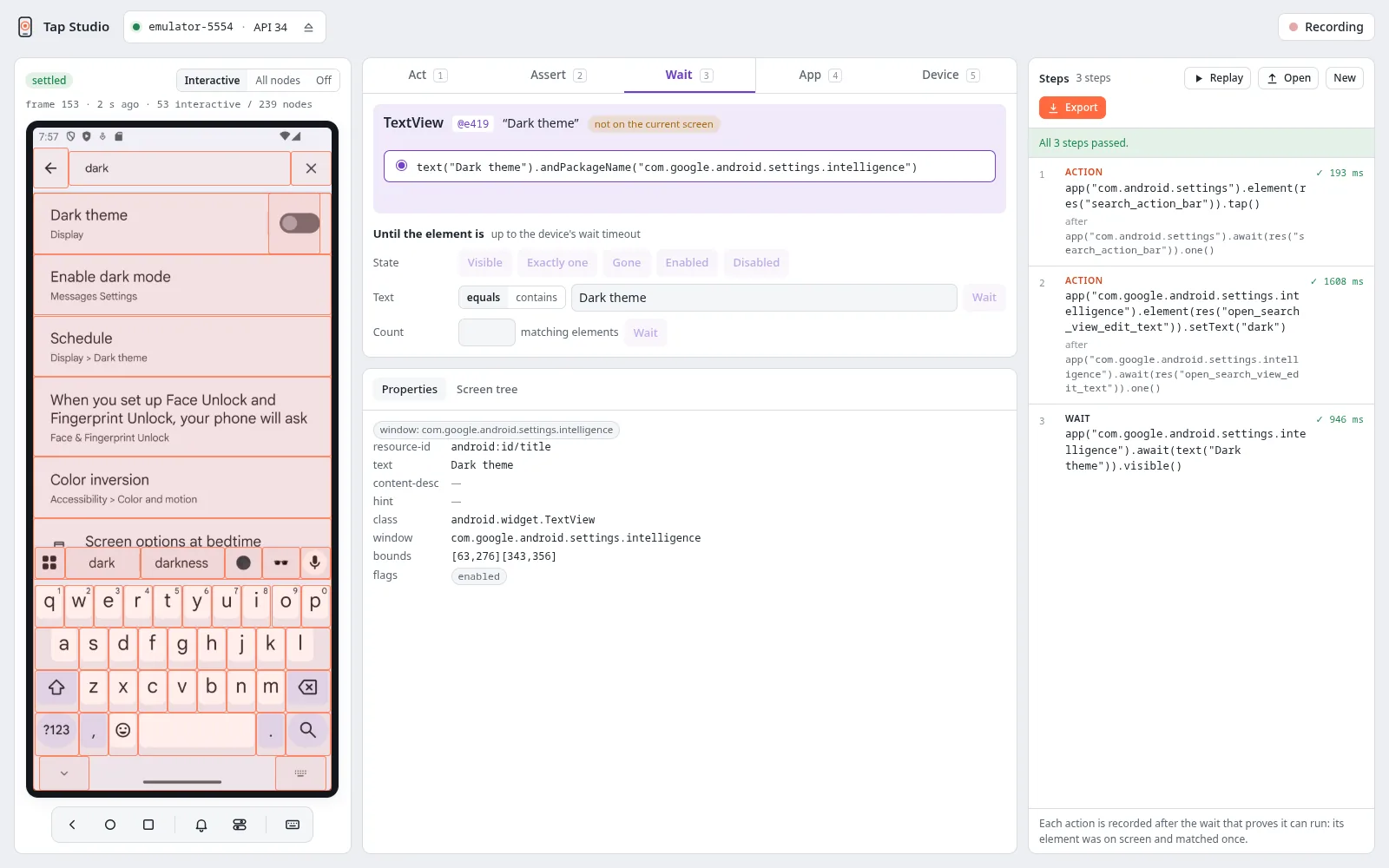
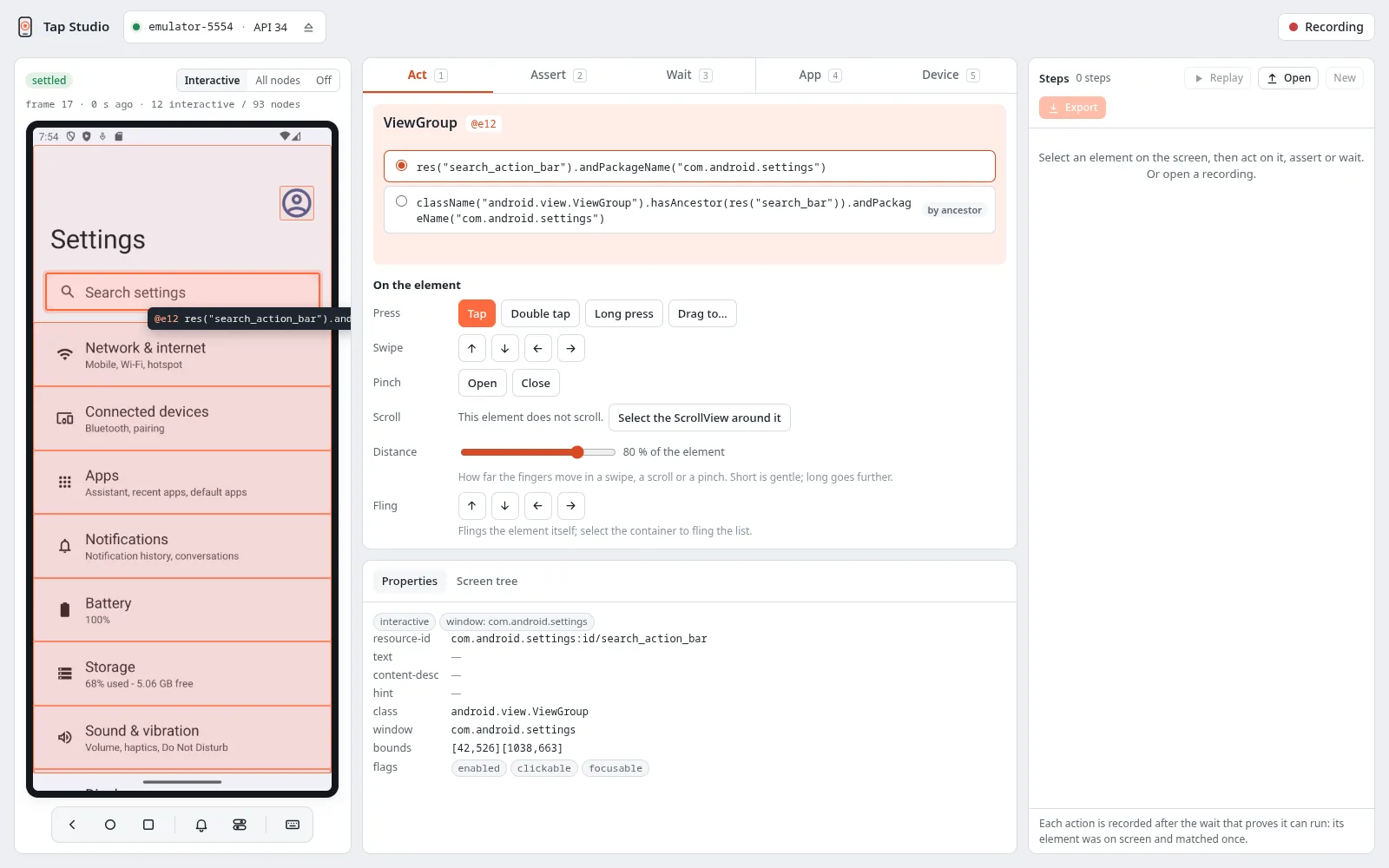
Tap Studio shows the device's screen with its elements outlined. Pick an element, choose what to do with it, and each step is recorded with the selector a test would use, never a screen coordinate. Replay the steps, then turn them into a test.
tap-watcher shows every device in your browser while your tests run: which test process
holds it, each action it runs, and the device's screen as video. Look back at the seconds
before a failure, compare the screen before and after an action, and save clips. It only
watches, so the tests run exactly as they would without it.
How it works
tap server
one per machine; owns ADB and the devices
You start the server once (tap start). Every client talks to it, so tests in Kotlin and Python,
an agent and Studio share the same devices without stepping on each other: a device is held by
one of them at a time, and tap-watcher can watch all of them. The driver is a separate app, so it survives your app being force-stopped
or cleared. Architecture has the details.
Why Tap
-
One match, or no action
Every action finds its element afresh and needs exactly one match. Zero or several fail with
NOT_FOUNDorAMBIGUOUSbefore anything touches the device. -
Waits you can see
No hidden retries or implicit waits. A test waits where it says so, for a condition it names, so it stays fast and predictable.
-
Failures with evidence
Every failure has a specific code, plus a screenshot, the screen layout and the driver log of each device in the test.
-
Several devices in one test
Chat, calls, sharing: give each device a role and drive them together from one test.
-
Built for coding agents
A CLI and an MCP server that read the screen as text with refs, report what each step changed, and export the session for a test.
-
Docs your agent can read
Every page is also published as Markdown (
guide/selectors/isguide/selectors.md), andllms-full.txtholds the whole guide in one file for an agent to read.
Coming from another tool?
Coming from Maestro or Appium maps each tool's everyday commands to Tap and calls out where Tap deliberately behaves differently.
Open source
Tap is open source under the Apache License 2.0. Issues and pull requests are welcome on GitHub; see the contributing guide.