Steps and export
Editing steps
Click a step to open it:
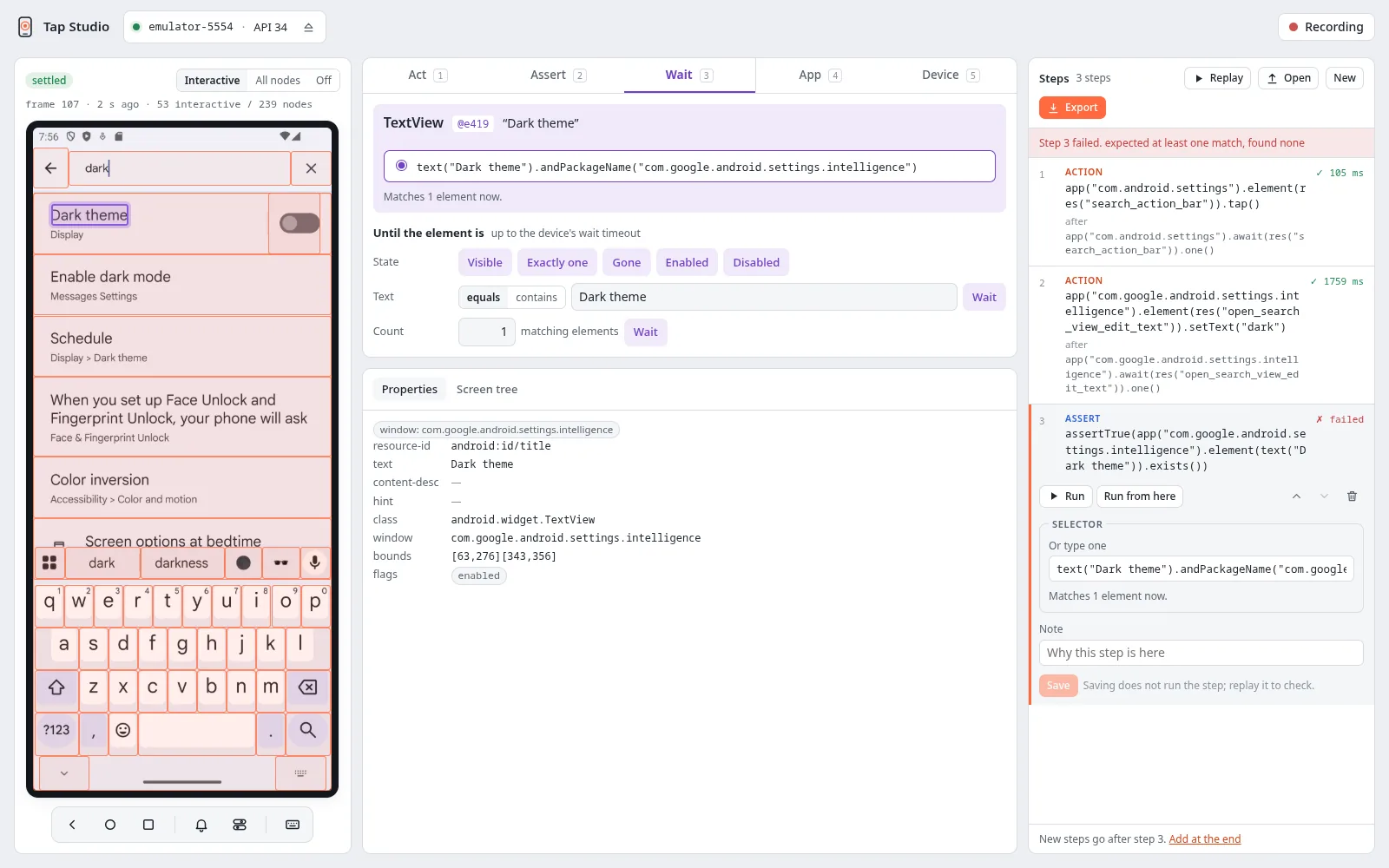
- Selector: choose another candidate, or type a selector in the Kotlin DSL
(
res("search").hasAncestor(res("toolbar")),text("Add").at(1)). A recorded selector usually ends in.andPackageName("com.example.basket"): the package of the element's app, which a test writes asapp("com.example.basket").element(…). Remove it to match on the whole screen. The line below shows how many elements the selector matches on the current screen. - Value and secret: change the text of a set text or type step, or make it secret, and the expected text of a text wait or assertion.
- Scroll until: change the selector of the element a scroll until brings into view, its direction, its distance and its maximum number of scrolls.
- Gesture: change a swipe's or a scroll's direction and distance.
- Note: a free-text note, kept in the file.
- Run runs the step alone. Run from here runs it and every step after it. Move up, move down and delete are there too.
New steps go after the selected step, or at the end when none is selected.
Replay
Replay runs every step from the first and stops at the first failure. The failed step shows the driver's error. If the recording does not start with an app step, the page offers to cold launch the app first, because a replay from an unknown screen is not reproducible. Steps with secrets ask for the values before the run. The values are kept only while the studio runs.
Export and open
Export shows the recording as tap-recording/1 JSON, with Copy JSON and Download.
Open loads such a file to continue or replay it. New starts an empty recording. Both ask
before discarding recorded steps.
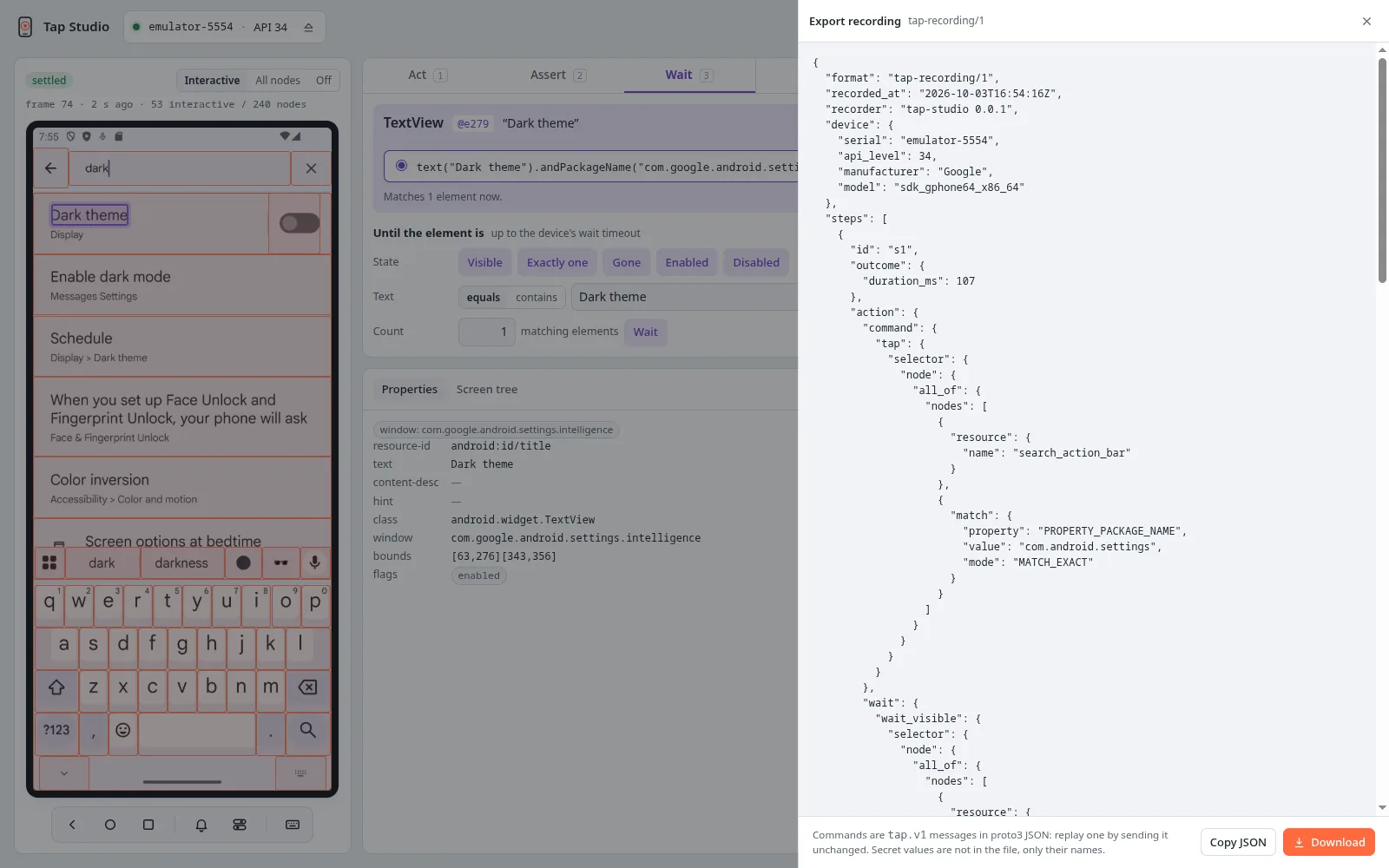
{
  "format": "tap-recording/1",
  "recorded_at": "2026-09-30T09:12:44Z",
  "recorder": "tap-studio 0.0.1",
  "device": {"serial": "emulator-5554", "api_level": 34, "manufacturer": "Google", "model": "sdk_gphone64_x86_64"},
  "steps": [
    {"id": "s1", "app": {"operation": "cold_launch", "package_name": "com.example.basket"}},
    {"id": "s2", "action": {
      "command": {"set_text": {"selector": {"node": {"all_of": {"nodes": [{"resource": {"name": "search"}},
        {"match": {"property": "PROPERTY_PACKAGE_NAME", "value": "com.example.basket", "mode": "MATCH_EXACT"}}]}}}, "text": "wool"}},
      "wait": {"wait_visible": {"selector": {"node": {"all_of": {"nodes": [{"resource": {"name": "search"}},
        {"match": {"property": "PROPERTY_PACKAGE_NAME", "value": "com.example.basket", "mode": "MATCH_EXACT"}}]}}}, "exactly_one": true}},
      "selector_origin": "SELECTOR_ORIGIN_SYNTHESIZED"}},
    {"id": "s3", "wait": {"selector": {"node": {"match": {"property": "PROPERTY_TEXT", "value": "3 results"}}},
      "condition": "CONDITION_VISIBLE"}},
    {"id": "s4", "assertion": {"selector": {"node": {"resource": {"name": "checkout"}}},
      "check": "CHECK_ENABLED"}}
  ]
}
Steps carry tap.v1 messages in proto3 JSON, the same encoding as the
gRPC API. Any language can read them, and a step replays by sending
its messages unchanged: an action's wait, then its command. The file records the device it
was made on, but it replays on any device. It never contains a secret's value, only its name
("secret": "password", listed in secrets at the top).
Turning a recording into a test
The studio does not generate code. A recording maps one to one onto the client APIs, so you, or a coding agent (tap-agent), write the test from it:
| Step | Kotlin | Python |
|---|---|---|
app cold_launch |
app.coldLaunch() |
app.cold_launch() |
action set_text on res("search") in com.example.basket |
app.await(res("search")).one().setText("wool") |
app.wait(res("search")).one().set_text("wool") |
wait CONDITION_VISIBLE, no package |
device.screen.await(text("3 results")).visible() |
device.screen.wait(text("3 results")).visible() |
assertion CHECK_ENABLED |
assertTrue(device.screen.element(res("checkout")).isEnabled()) |
assert device.screen.element(res("checkout")).is_enabled() |
assertion CHECK_TEXT_EQUALS "Wool" |
assertEquals("Wool", ….text()) |
assert ….text() == "Wool" |
scroll_until on res("list"), target text("Row 40") |
….element(res("list")).scrollUntil(text("Row 40")) |
….element(res("list")).scroll_until(text("Row 40")) |
app_wait wait_app_visible / wait_screen_stable |
app.awaitVisible() / app.awaitScreenStable() |
app.await_visible() / app.await_screen_stable() |
action set_orientation (no selector) |
device.setOrientation(Orientation.LANDSCAPE) |
device.set_orientation(Orientation.LANDSCAPE) |
device_wait await_toast |
device.awaitToast("Saved") |
device.await_toast("Saved") |
device set_animations |
device.setAnimations(false) |
device.set_animations(False) |
device_assertion DEVICE_CHECK_KEYBOARD_SHOWN |
assertTrue(device.keyboardShown()) |
assert device.keyboard_shown() |
A selector whose top-level conjunction has a PROPERTY_PACKAGE_NAME match is that app's:
app = device.app("com.example.basket"), and the rest of the selector goes to
app.element / app.await. A selector without one is device.screen's. The step list shows
each step that way.
Keep the selectors the studio chose: they matched exactly one element when the step was recorded, and replay proved them.